




Running an Etsy shop from a phone can become surprisingly repetitive. I often found myself checking an order, answering a buyer, adjusting a listing, and then remembering that another small task still needed attention. That is the recurring problem Etsy Seller: Manage Your Shop tries to remove. Instead of treating the marketplace as something I can only manage from a desktop browser, it puts the shop’s everyday work into a mobile app.
My overall impression is that this is most useful as a companion for active Etsy sellers rather than a complete replacement for every desktop workflow. It helps me stay connected to the shop when I am away from my computer, and that matters when a buyer needs a quick answer or an order requires attention. The app is free, aimed at business use, and developed by Etsy, Inc. Its average rating is 4.6 from around 54 thousand ratings, with over 5 million installs, so it is clearly being used as a practical tool by a large seller community.
Where Etsy Seller earns its place on my phone
The first setup is about reducing future interruptions
The most valuable way to approach this app is not to install it casually and forget about it. I would set it up with a specific purpose: handle the shop tasks that are most likely to interrupt the day. For one seller, that may be buyer messages. For another, it may be checking orders while packing products, reviewing listings during a market day, or keeping an eye on shop activity while traveling.
That distinction is important because the mobile experience feels strongest when I use it for short, focused sessions. I can open the app, deal with the immediate issue, and return to whatever I was doing. It is less appealing when I expect the phone to provide the same comfortable workspace as a large monitor, especially for work that involves carefully editing lots of listing details.
I would begin by confirming that the correct Etsy shop account is connected and then spend a few minutes finding the main areas I expect to use. A seller who knows where orders, messages, listings, and shop-management tools are located will get much more from the app than someone who simply opens it whenever a notification appears. My practical tip is to decide which tasks belong on the phone and which belong in a longer desktop session before the shop becomes busy.
The best setup is a division of labor, not an attempt to make the phone do everything. I use the app for responsiveness and quick decisions, while a browser or larger screen remains more comfortable for concentrated catalog work. That approach reduces the temptation to rush through detailed edits on a small display.
A realistic day with the seller app
Imagine a seller preparing parcels at the kitchen table. A buyer sends a question about an item, an order arrives, and the seller notices that a listing needs a small correction. Without a mobile tool, those jobs may wait until the packing is finished or until the seller gets back to a computer. With Etsy Seller, I can deal with the message while the relevant product is still in front of me, check the order details before sealing the package, and make a quick shop adjustment without changing rooms.
This is where the app saves more than a few taps. It keeps the shop connected to the physical work behind it. If I am photographing products, organizing stock, or attending an event, I do not have to rely on memory for every digital follow-up. I can handle the part that needs an immediate response and leave the deeper work for later.
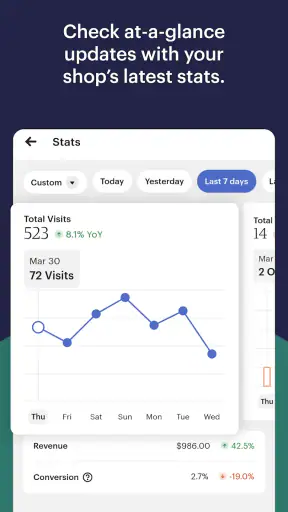
Another useful scenario is a short break during a busy day. I can review what needs attention instead of opening a full desktop session for a single question. That makes the app particularly suitable for solo sellers who are also producing items, managing packaging, handling customer service, and dealing with ordinary life at the same time.
There is also a quieter benefit: the app encourages me to separate urgent work from work that can wait. A buyer message may deserve a prompt response, while rewriting several descriptions can be postponed. That simple distinction prevents the common mistake of treating every shop task as equally urgent.
Messages are where mobile access feels most natural
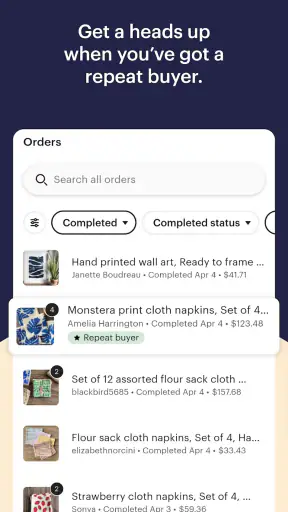
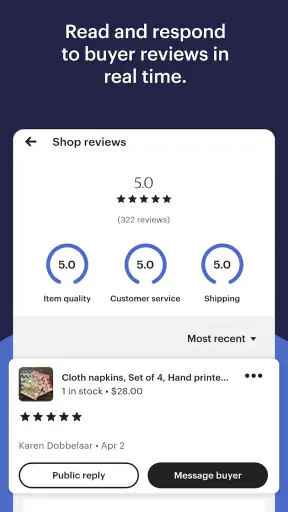
For me, communication is one of the clearest reasons to keep the app installed. Buyer conversations are time-sensitive in a way that catalog maintenance often is not. A short, clear answer can prevent confusion about an order or help a shopper decide whether an item suits their needs. Having the shop conversation available on the phone makes it easier to respond while the details are still fresh.
I would still avoid writing rushed replies just because the app is convenient. A useful workflow is to read the entire conversation, check the related item or order, and then answer with the specific information the buyer needs. The small screen can encourage quick typing, but accuracy matters more than speed when discussing handmade products, variations, personalization, or delivery expectations.
One non-obvious advantage is that the phone can connect a conversation with the physical product. If a buyer asks about color, size, or an item detail, I may be able to inspect the product or packaging immediately instead of guessing from memory. That does not turn the app into a product-management system, but it makes the seller’s response more grounded.
Orders become easier to handle between other tasks
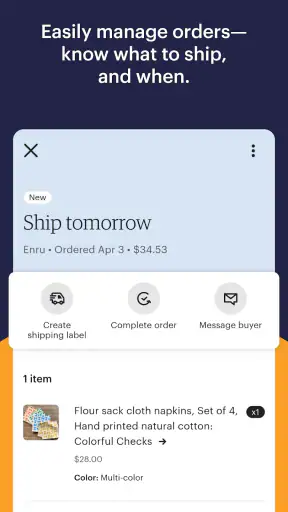
Order management is another area where the app fits naturally into short sessions. I can check what needs attention before beginning a packing run, then refer back to the relevant information while preparing parcels. This is especially helpful when the shop is not operated from a dedicated office and the seller moves between a workbench, storage area, and shipping supplies.
I would not treat a quick mobile check as a substitute for a careful fulfillment routine. The app can help me see what is happening, but I still need my own physical system for matching products, checking personalization, and confirming that the parcel is ready. The strongest workflow combines the app’s visibility with a simple packing checklist.
A practical tip is to use the app at two different moments: first as a planning glance before packing, and again as a confirmation step after the parcel is prepared. That reduces the chance of discovering an overlooked order only after the day’s work has been put away. It also makes the mobile device useful without forcing me to stare at it throughout the entire process.
Listing work is convenient, but not equally comfortable
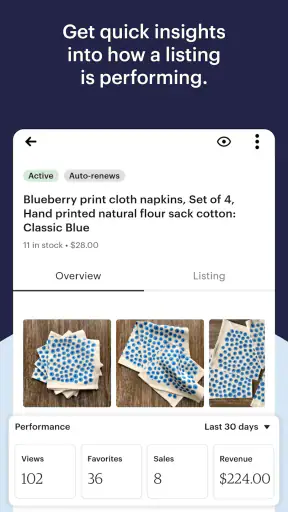
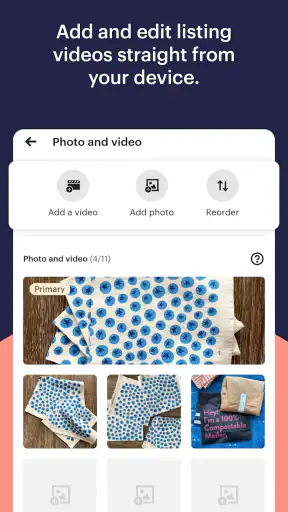
Being able to manage listings from a phone is valuable when I notice a small correction away from my desk. A title detail, description adjustment, or other minor change does not always justify waiting for a computer. This is one of the ways the app removes friction: the idea can become an actual update while I still remember why it matters.
However, I am more cautious with substantial listing work on a small screen. Creating or revising several products requires concentration, comparison, and careful proofreading. A desktop browser is usually the better choice when I need to make many related changes or inspect a large amount of text. The mobile app is best for targeted edits, not for turning a phone into a full catalog workstation.
My advice is to use the app for one clearly defined listing task at a time. Before saving, I would reread the changed section rather than assuming that a quick edit is harmless. This matters particularly for sellers who use similar descriptions across products, because a small mistake can be repeated if the seller works too quickly.
What it removes from the usual seller routine
The biggest friction removed is the need to be physically near a computer for every small decision. That sounds modest, but shop management is often made up of small decisions. Should I answer this question now? Does this order need attention? Is this listing still accurate? Can I correct that detail before a buyer sees it? Etsy Seller turns those questions into actions I can take during the gaps already present in my day.
Compared with relying only on a desktop browser, the app is more immediate and better suited to sellers who move around. Compared with trying to manage a shop through a general mobile browser, a dedicated seller app feels more direct because it is designed around shop activity rather than the wider marketplace experience. I do not have to begin with browsing as a buyer before reaching the work that matters to me as a seller.
That focus also changes how I think about notifications and interruptions. A seller can become distracted by checking the shop too often, so I would use the app intentionally rather than constantly refreshing it. Short review windows work better for me: check messages, inspect orders, make only the necessary response, and close the app. The goal is saved time, not a new habit of monitoring the shop every few minutes.
Another useful trade-off is mobility versus context. The phone gives me access at the moment a problem appears, but the desktop gives me more room to compare information and think carefully. The app wins when timing is important; the browser wins when the task is broad, repetitive, or detail-heavy. Recognizing that difference prevents disappointment.
Who will benefit most from it
I would recommend Etsy Seller to independent sellers who manage their own customer communication and order flow. It is particularly well suited to people who make products outside a traditional office, attend markets, travel between workspaces, or simply do not want every shop task to wait until evening. Sellers who value quick access will notice the benefit almost immediately.
It is also a sensible choice for someone starting to take shop administration more seriously. The app can make the business side feel closer to the creative side because messages, orders, and listing work are available alongside the physical products. That proximity may help a new seller build a more consistent routine instead of treating shop administration as a separate chore.
I would be less enthusiastic for a seller whose work depends on long editing sessions, extensive catalog organization, or a large amount of side-by-side comparison. In that situation, a desktop browser remains more comfortable. The app can still be useful for messages and quick checks, but it should not be the only tool in the workflow.
Small-screen limitations I noticed
The main limitation is not that the app lacks a reason to exist; it is that mobile work has natural boundaries. Typing long descriptions, reviewing multiple details, and making careful changes can feel slower on a phone than on a full keyboard and larger display. Sellers with larger catalogs may also prefer to reserve structured maintenance for a desktop session.
There is a second limitation in the way convenience can encourage haste. Because the app makes shop work available anywhere, I may be tempted to edit something while distracted, between errands, or during packing. That is useful for urgent corrections but risky for changes that deserve proofreading. The app removes access friction, but it cannot replace a deliberate review habit.
I also would not judge the app by whether it completely replaces every alternative. A browser-based Etsy session is still preferable when I want a broader view and more comfortable text entry. A separate notes or inventory routine may remain useful for sellers who need detailed production planning. Etsy Seller is strongest as the shop-control layer, not as a universal replacement for every business tool.
Version, access, and everyday suitability
The app is free and carries an Everyone age rating, which makes it straightforward to consider for ordinary shop administration. The current version is 2.5.0, and it runs on Android 8.0 or later. Those requirements make it accessible to many existing Android users, although anyone with an older device should check compatibility before planning a workflow around it.
Its business category is appropriate because the app is focused on managing a shop rather than shopping for personal items. That distinction is useful when deciding what to install: this is the seller-facing workspace for Etsy activity, and its value depends on whether I actually operate a shop. Someone who only buys on Etsy would be looking for a different kind of app experience.
The developer, Etsy, Inc, gives the app a clear connection to the marketplace it serves. That is important to me because seller tools are more useful when they are tied directly to the shop environment instead of relying on an unofficial workaround. Still, I would keep a browser option available for larger tasks and avoid assuming that one mobile tool should handle the entire business.
My final judgment for sellers
Etsy Seller: Manage Your Shop succeeds by addressing a very ordinary but costly problem: small shop tasks pile up when access is inconvenient. I like it most for messages, order awareness, quick checks, and focused listing adjustments. Those jobs fit the phone well and can prevent a seller from carrying a mental list of unfinished actions through the day.
Its weaknesses are equally practical. Detailed catalog work is less comfortable on a small display, and the ease of making changes can lead to rushed decisions. Sellers who expect a complete desktop replacement may find the experience limiting, while sellers who want a mobile companion will likely find it much more useful.
My recommendation is to use it as the fast-response side of an Etsy workflow. Keep the phone nearby for communication and time-sensitive shop decisions, then move to a larger screen when the work requires concentration, comparison, or extensive editing. For an active independent seller, that balance removes real friction without promising more than a mobile app can reasonably deliver.


